Punch list and invoicing app for contractors
Talk through the job.
Get the punch list.
Walk the site and say what needs doing. JobsiteHQ writes the punch list, the estimate and the invoice while you are still standing there - and your client pays it by card, straight from the link.
Or try it here first, no sign-up
Made for your phone - no app store, no laptop, no paperwork night.

“Very easy to use and intuitive. I really like the seamless ability to go from walkthrough to invoice.”


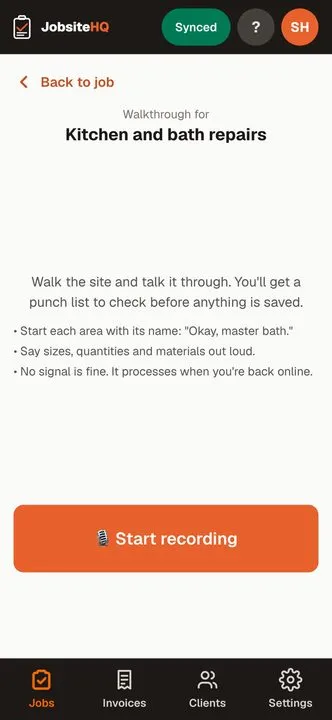
Try it right here. No sign-up.
Talk through a job. Watch the punch list appear.
Tap the button and say what needs doing, room by room, the way you'd tell a helper. Up to 45 seconds.
Try something like: “Master bath. Recaulk the tub, and the toilet runs, so it needs a new flapper. Kitchen. Two cabinet hinges are loose, and patch the hole behind the door, then repaint.”
JobsiteHQ doesn't keep your recording or what you said. It's turned into the list and thrown away.
Three taps from the site visit to the invoice
Step 1
Walk the job and talk
Start a recording and say what you see, room by room. No typing on a ladder, no notepad in your back pocket, no trying to remember it in the truck afterwards.
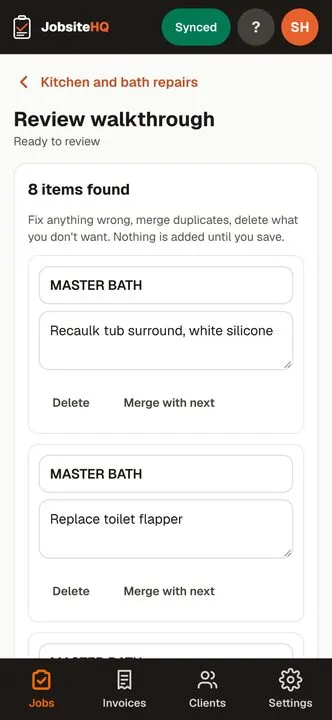
Step 2
Get the punch list
JobsiteHQ turns what you said into a clean, itemised punch list. Check it over, fix anything it misheard, and it is saved to the job.
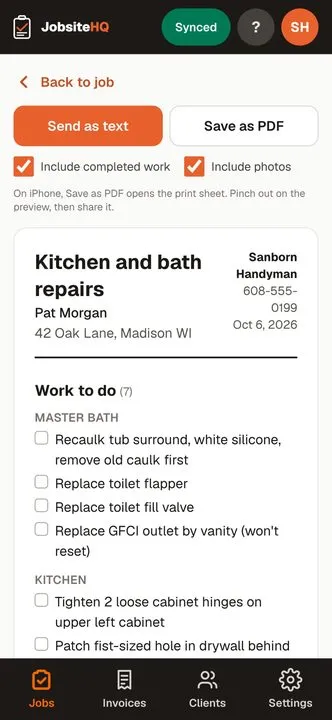
Step 3
Send the client the summary
One tap sends a tidy write-up with your photos, as a text or a PDF. The client sees what you found and what it will take, in plain language.
From the people using it
“Great app! Very easy to use and intuitive. I really like the seamless ability to go from walkthrough to invoice. The talk-to-text punch list is also great. 10/10 would recommend and continue to use.”
Travis EstellRegional Maintenance Supervisor, Investors AssociatedAnd everything after it
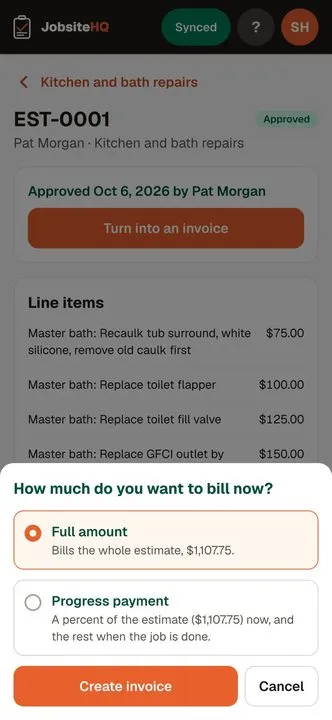
Estimates and invoices
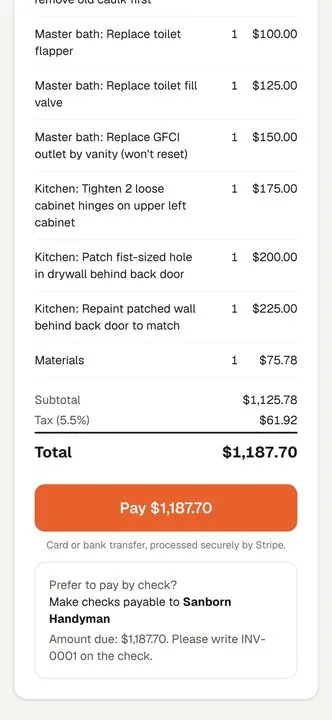
Price the punch list into an estimate, send it, and turn it into an invoice when the client approves. Your materials carry your markup.
Clients pay online
Take card payments from the invoice you already sent. Payments run on Stripe at their standard 2.9% + 30¢ per US card, straight to your bank. We add nothing on top.
Works with no signal
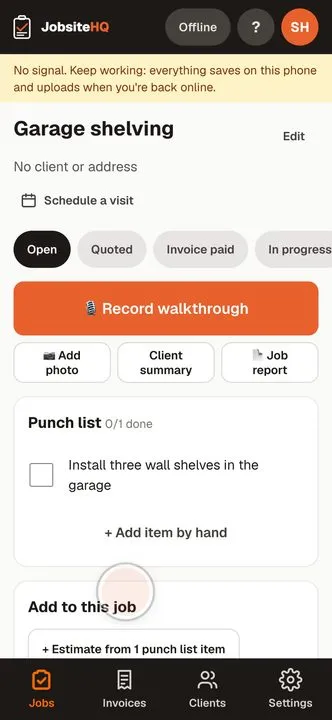
Basements, new builds, the middle of nowhere. Everything saves on the phone and catches up the moment you have bars again.
From walkthrough to paid, in half a minute
The app on a demo job, recorded on a phone and sped up: talk through the job, check the punch list it writes, turn the approved estimate into an invoice, and watch the client pay it by card.
Demo business and client. No sound.
One price. Everything in it.
No per-job fees, no add-ons, no setup call.
“Have a question or a feature request? You have my direct line. I built JobsiteHQ to make your field work seamless, and I handle every support email personally.”
$24.99 / month
or $199 a year - about 4 months free
Less than one lost invoice.
- Unlimited jobs and punch lists, up to 2 hours of recordings a day
- Client summaries, estimates and invoices
- Photos, receipts and job documents
- Online card payments to your own bank, through Stripe at 2.9% + 30¢ - nothing added by us
- Works offline, syncs when you are back
14 days free. No card to start.
Weighing it up against another app?
Not ready yet? Take a free punch list.
Printable checklists for the final walkthrough, one for each kind of job. No sign-up.
- Bathroom remodel
- Kitchen remodel
- New construction
- Basement finishing
- Interior painting
- Exterior painting
- Roofing
- Flooring installation
- Drywall
- Deck building
- Home inspection repair
- Rental turnover
Questions
- Is there an app to download?
- No app store. Open jobsitehq.app on your phone and sign up with your email. After your first punch list it shows you how to add it to your home screen, where it opens full screen like any other app and works offline.
- Do I need a card to try it?
- No. The free trial is 14 days with no card. Add one before it ends if you want to keep going; if you do not, the trial just ends and nothing is charged.
- What does it do with my recording?
- It transcribes what you said and writes it up as a punch list. The recording and the write-up belong to your job and are not shown to anyone you have not sent them to.
- Does my client need an account?
- No. Summaries, estimates and invoices open as an ordinary web page from the link you send. They tap to approve or to pay.
- What kind of work is this for?
- Remodels, punch lists, handyman and trade work - anyone who walks a site, writes up what needs doing, and bills for it. It is built for one person or a small crew, not for a big office.
- I already do my walkthroughs on paper. Why switch?
Because paper makes you do the job twice. You write it up on site, then type it into an estimate at the kitchen table that night, and into an invoice later, after a full day on the tools. Every copy is a chance to drop a line, like the outlet you noticed or the trim you said you'd touch up, and a forgotten line is work you do for free. Meanwhile the client is waiting on a price, with all day to call someone else.
With JobsiteHQ you say it once. The punch list and estimate are ready to send before you leave, the invoice comes from the same list when the work is done, and the client pays it by card from the link instead of you waiting on a check. Coming from another app? There's nothing to move over: start your next job here and finish the old ones where they are.
Do your next walkthrough both ways, notepad and phone, and keep whichever gives you your evening back. Start the free trial: 14 days, no card.
- What does it cost when a client pays by card?
- Card payments run on Stripe. Stripe takes its standard 2.9% + 30¢ per US card payment and the rest goes straight to your bank. JobsiteHQ adds no fee and never holds your money.
- Who is behind JobsiteHQ?
- Mike Sanborn builds and runs JobsiteHQ. Mail to mike@jobsitehq.app goes straight to Mike, not a call center.
Try it on your next walkthrough
Open it on the phone that is already in your pocket. You will have a punch list before you are back in the truck.
Start your free trial