A Jobber alternative for one-person shops
Jobber is a full field service system that grows with a team. If you're one person or a small crew, you mostly need to walk the job, write it up and get paid. Here's how JobsiteHQ compares.
How much does Jobber cost compared to JobsiteHQ?
Jobber's cheapest plan is $49 a month, month to month, for one user. JobsiteHQ is $24.99 a month with everything in it.
Jobber's prices are from their pricing page on October 2, 2026, in US dollars. Prices change, so check theirs before you decide.
What does a year cost for one person?
Jobber Core comes to $588 a year paid month to month, or $348 on yearly terms. JobsiteHQ comes to $299.88 month to month, or $199 paid yearly.
Worked out from the prices above. Card payment fees are on top of either, and go to the card processor.
What does JobsiteHQ do differently from Jobber?
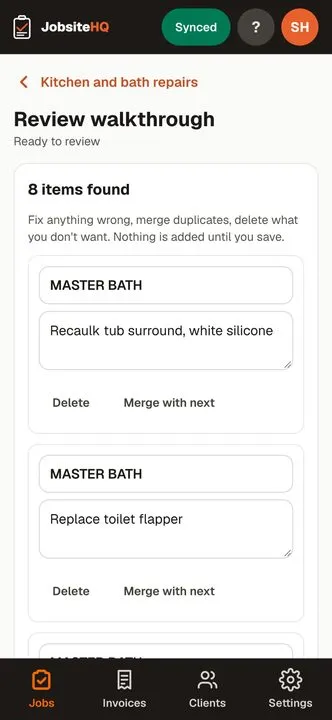
It writes the punch list from what you say on the walkthrough, and keeps the whole job in one place.
- You talk, it writes the punch list
- Start a recording, walk the job and say what you see. JobsiteHQ turns it into an itemised punch list, sorted by area, for you to check over.
- The client sees the job, not just a price
- Send a tidy summary of what you found, with your photos, by text or as a PDF - then the estimate, then the invoice, all from the same job.
- One price, no tiers
- Everything is in the one plan: punch lists, summaries, estimates, invoices, card payments, photos, receipts and documents. Card payments go to your own Stripe account at Stripe's rates; JobsiteHQ takes nothing from them.
- Works with no signal
- Basements and new builds are where the walkthroughs happen. Everything saves on the phone and syncs when you have bars again.
Jobber may suit you better if
- You run several crews and have someone in the office scheduling and dispatching them.
- You want customers to book online as part of the same system.
- You'd rather have an app from the App Store or Google Play. JobsiteHQ runs from your phone's browser and adds itself to your home screen.
JobsiteHQ fits if
- You do the walkthrough yourself and want the punch list written while you're still on site.
- You want estimates, invoices and card payments without paying for team features you won't use.
- You want one price that doesn't change as you use more of it.
How does a job run in JobsiteHQ?
From one phone, in the order the work happens.
- Open the job and start a recording. Walk the site and say what you see, room by room.
- JobsiteHQ writes the punch list, sorted by area. You check it and fix anything it misheard.
- Send the client a summary with your photos, as a text or a PDF. They don't need an account.
- Price the list into an estimate. When the client approves it, turn it into an invoice.
- The client pays by card from the invoice link, and the money goes to your bank.
On a $1,200 invoice paid by card, Stripe's 2.9% + 30¢ comes to $35.10. You get $1,164.90. JobsiteHQ adds nothing to the fee.
How do you switch from Jobber to JobsiteHQ?
Start your next new job in JobsiteHQ, and finish the jobs already open in Jobber where they are.
- Open jobsitehq.app on your phone and sign up with your email. The trial is 14 days, no card.
- In Settings, add your business name, phone, email and logo. They go on every summary, estimate and invoice.
- Set up card payments in Settings. Stripe asks for your bank details directly; JobsiteHQ never sees them.
- Add each client the first time you work for them. There's no import from Jobber yet.
Try it on your next walkthrough
Open jobsitehq.app on your phone, sign up with your email and record the next job you walk. 14 days free, no card. If it isn't for you, the trial just ends.
Start your free trialQuestions
- Can I move my Jobber clients over?
- There's no import yet. Most people start JobsiteHQ on their next job and add clients as they come up.
- Is JobsiteHQ really half the price of Jobber?
- Month to month, Jobber's cheapest plan (Core) is $49 and JobsiteHQ is $24.99, according to Jobber's pricing page on the date at the bottom of this page. On yearly terms Jobber Core is $29 a month billed yearly; JobsiteHQ is $199 a year.
- Does JobsiteHQ work for a crew?
- It's built for one person or a small crew, not a big office. If you dispatch several crews from an office, Jobber's bigger plans are made for that.
Other comparisons
Jobber, Housecall Pro, Joist are trademarks of their owners. JobsiteHQ isn't affiliated with or endorsed by any of them.